ImmoManager

Your properties. Always under control.

The app for Mac, Windows, iOS, and Android — utility billing, HOA billing, reserve fund account, AI lease analysis, declaration of division import, and AI assistant in one application. Local. No subscription.

Please note: ImmoManager is currently only available in Germany.

All legal texts, billing, and compliance are tailored to German law (GoBD, DSGVO, German tenancy law). If you are based outside Germany and interested in the product, please get in touch.

Discover features

Read User Manual →

ImmoManager – Rental & HOA Management Without the Overhead

For landlords and HOA managers who handle their own properties — without specialist software and without monthly costs.

Anyone who rents out property privately or self-manages a homeowners' association juggles the same tasks every year: recording operating costs, allocating them, settling accounts. Searching for receipts. Drawing up a correct utility bill for the tenant or a service charge statement for the owners. And keeping track of everything come tax return time.

ImmoManager takes exactly this work off your hands — for individual rental units as well as entire HOAs. You maintain properties, tenants, owners, and expenses — the rest runs automatically: statements at the push of a button, annual tax overview, reserve fund account with interest certificate via AI — all as PDF download. Receipts are attached directly to the transaction and can be exported as a ZIP file.

For automatic receipt reading, ImmoManager supports four AI providers: OpenAI (GPT-4o), Anthropic Claude (Haiku), Mistral (Pixtral), and Google Gemini. You choose the service according to your preferences — all work on a pay-per-use basis, no monthly subscription required.

New: Lease Analysis — AI reads your lease and remembers which costs you are contractually entitled to pass on to this tenant. Declaration of Division Import — import HOA units from the declaration of division document instead of typing everything manually. AI Assistant — get answers to questions about tenancy law, service charges, and billing directly in the app.

ImmoManager – HOA Management

🏠 Individual Units: Rental Management

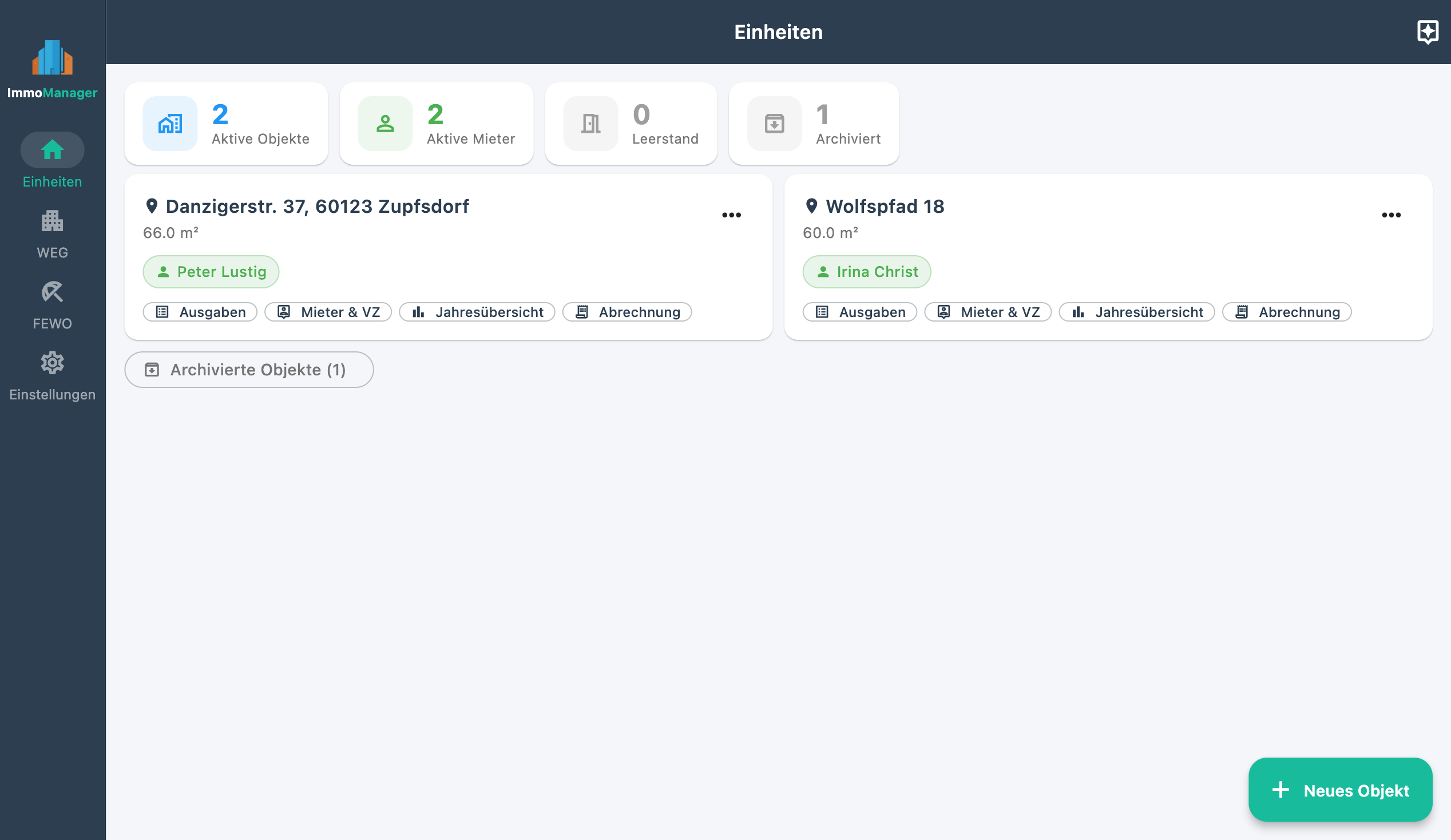
Dashboard showing the status of all units: rented, vacant, archived. Utility billing, tax overview, and receipt management — all in one view, directly accessible.

🏢 HOA: Service Charge & Reserve Fund

Create HOAs with any number of units and owners. Import the declaration of division via AI. Calculate service charge and reserve fund contribution per unit, distribute expenses by co-ownership share or floor area, manage the reserve fund account.

📄 Statements at the Push of a Button

Utility bills for tenants and service charge statements for HOA owners — ImmoManager calculates the balance and allocation automatically and produces print-ready PDFs.

🧮 Tax Overview for Schedule V

Income and deductible expenses per property and tax year, broken down by cost category. As a PDF for the accountant or to complete yourself.

📋 Lease Analysis

AI reads your lease and extracts all clauses relating to service charges, allocable costs, and special agreements. The AI assistant takes the contract into account when answering every question.

💬 AI Assistant

Ask questions about tenancy law, service charge law, and billing directly in the app. The assistant knows your expenses, tenant data, and the analysed lease — and gives answers tailored to your specific situation.

Dashboard & Property Management

All properties. At a glance.

100% Overview

The dashboard shows at a glance which units are rented, which are vacant, and which are archived. The most important actions for each property are directly accessible — no navigating through submenus.

Active tenants are shown by name. Former tenants remain accessible with their billing history. Properties can be archived without losing historical data.

Unit overview

Record expenses & attach receipts

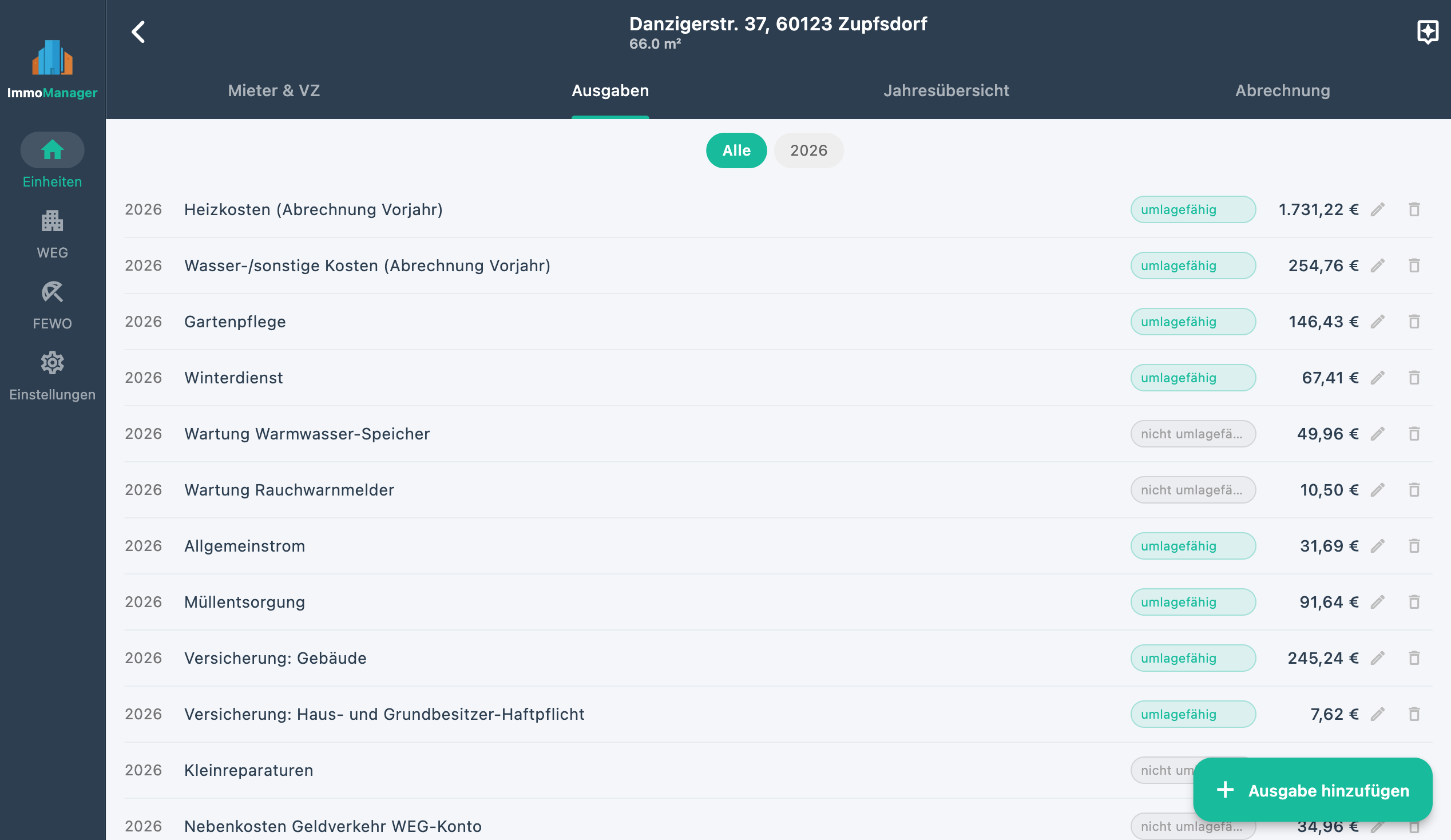
All expenses per property are recorded with amount, description, and category. Crucially for billing: you specify whether an expense is allocable (goes into the utility bill) or not (tax-deductible).

For each expense you can upload one or more receipts — PDFs or photos. Receipts are stored securely locally and can be exported as a ZIP file at any time.

Recording expenses

Managing a Rental Property – Quick Overview

Create a property, add a tenant, read in expenses via AI, and produce a utility bill at the push of a button — all in two minutes.

HOA Management

Service charge, reserve fund, and owner statements — in the same app.

Units, Owners & Service Charge

100% Overview

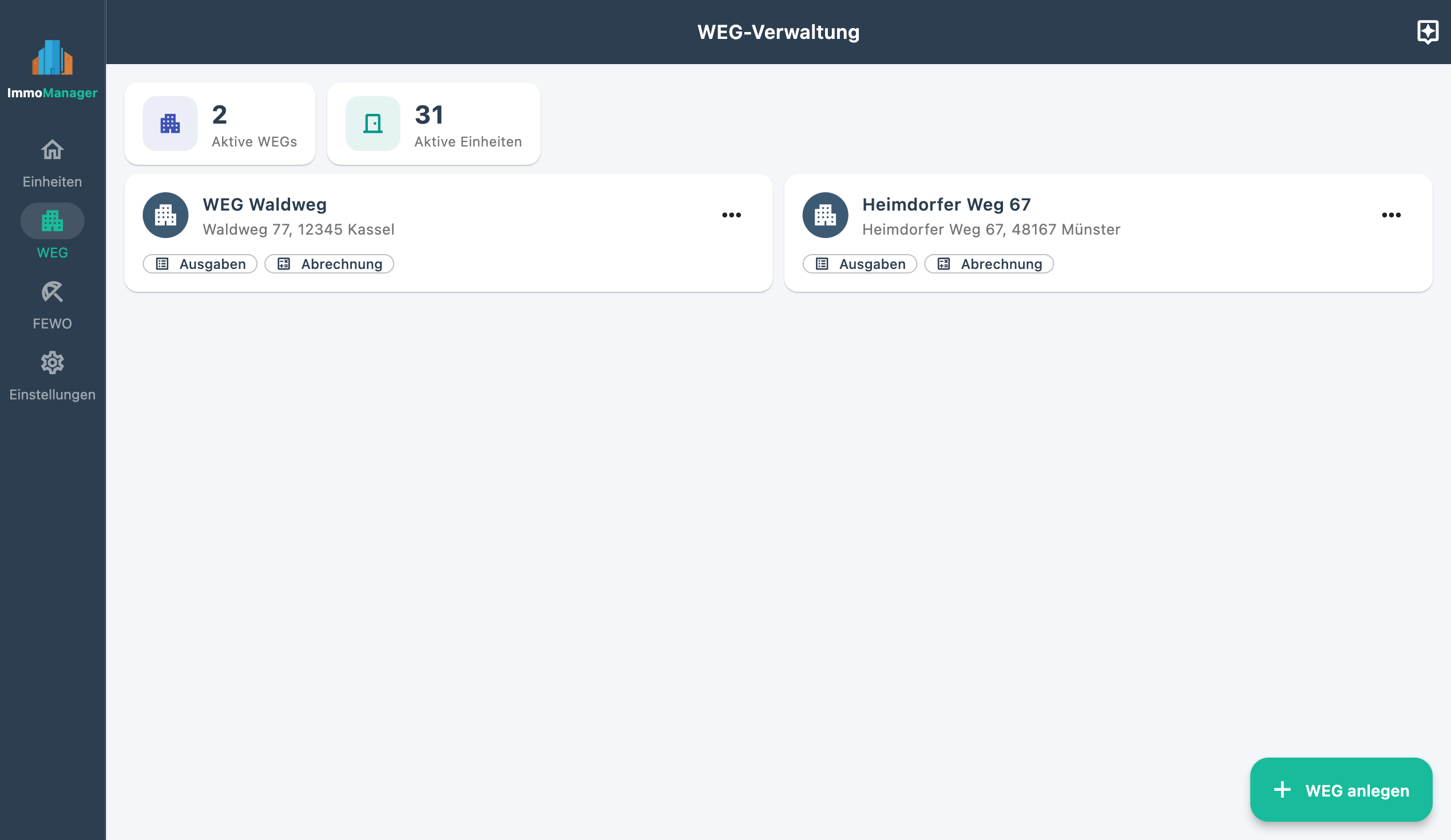
Create an HOA with any number of units. For each unit you record the owner, co-ownership share (MEA), floor area, and the monthly service charge and reserve fund contribution. The HOA dashboard shows all units at a glance — who lives there, how much service charge and reserve contribution is due, and a direct link to the statement for the respective year.

Expenses are recorded with a flexible allocation key: equally, by area, by number of occupants, by co-ownership share, or assigned directly to an individual unit.

HOA unit overview

Read in the Declaration of Division via AI

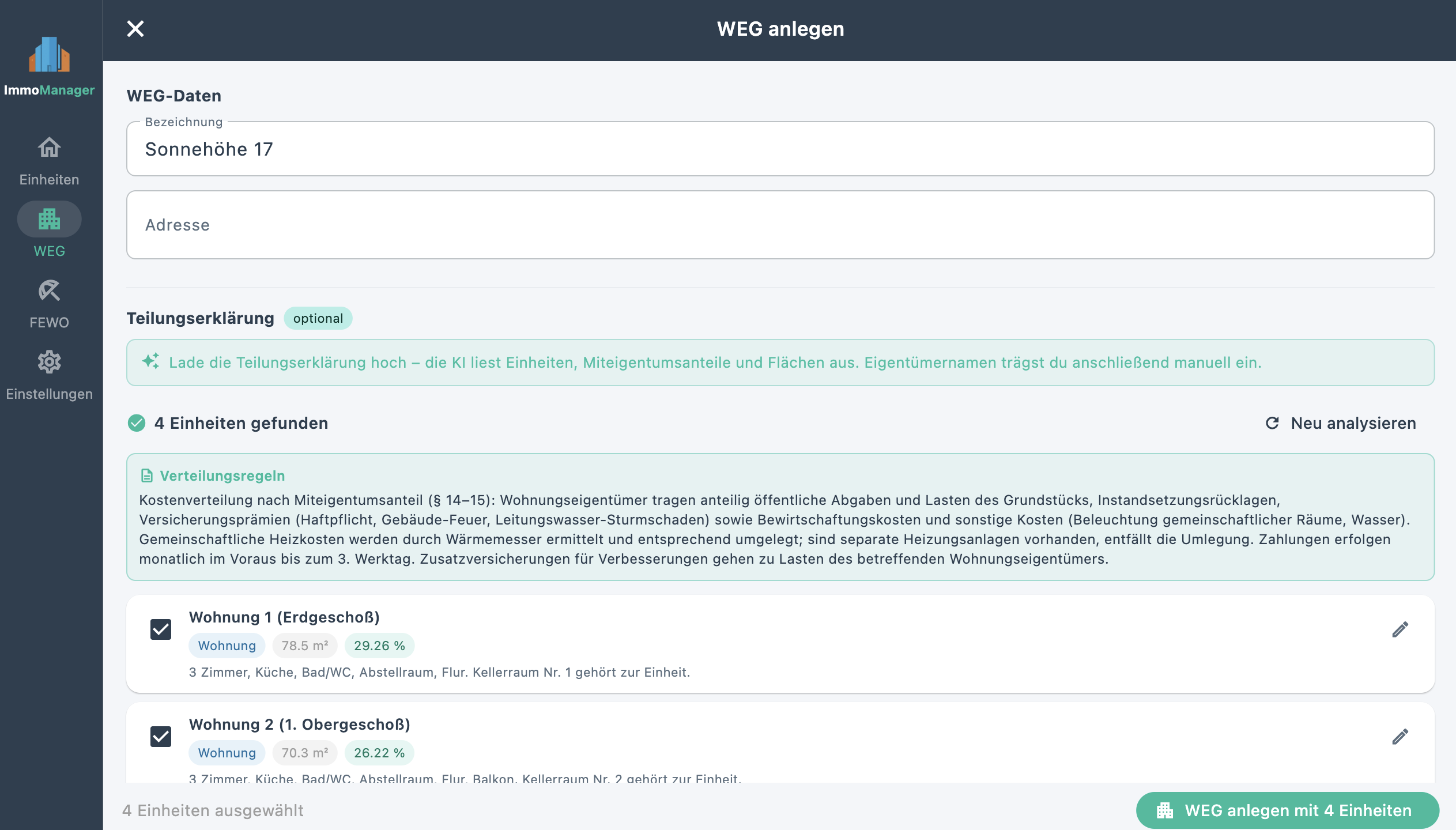
The declaration of division (TE) is the founding document of every HOA and contains all units with co-ownership shares, floor area data, and special use rights. Instead of entering each unit manually: upload the TE as a PDF, AI analyses the document, and suggests all units for import.

You review the result, adjust designations, and import with one click. An HOA with 10 units set up in minutes instead of hours.

Reading in the declaration of division via AI

HOA Management – Quick Overview

Import the declaration of division via AI, record expenses with allocation keys, create service charge statements per owner — this is how HOA management works with ImmoManager.

Reserve Fund Account & Interest Certificate

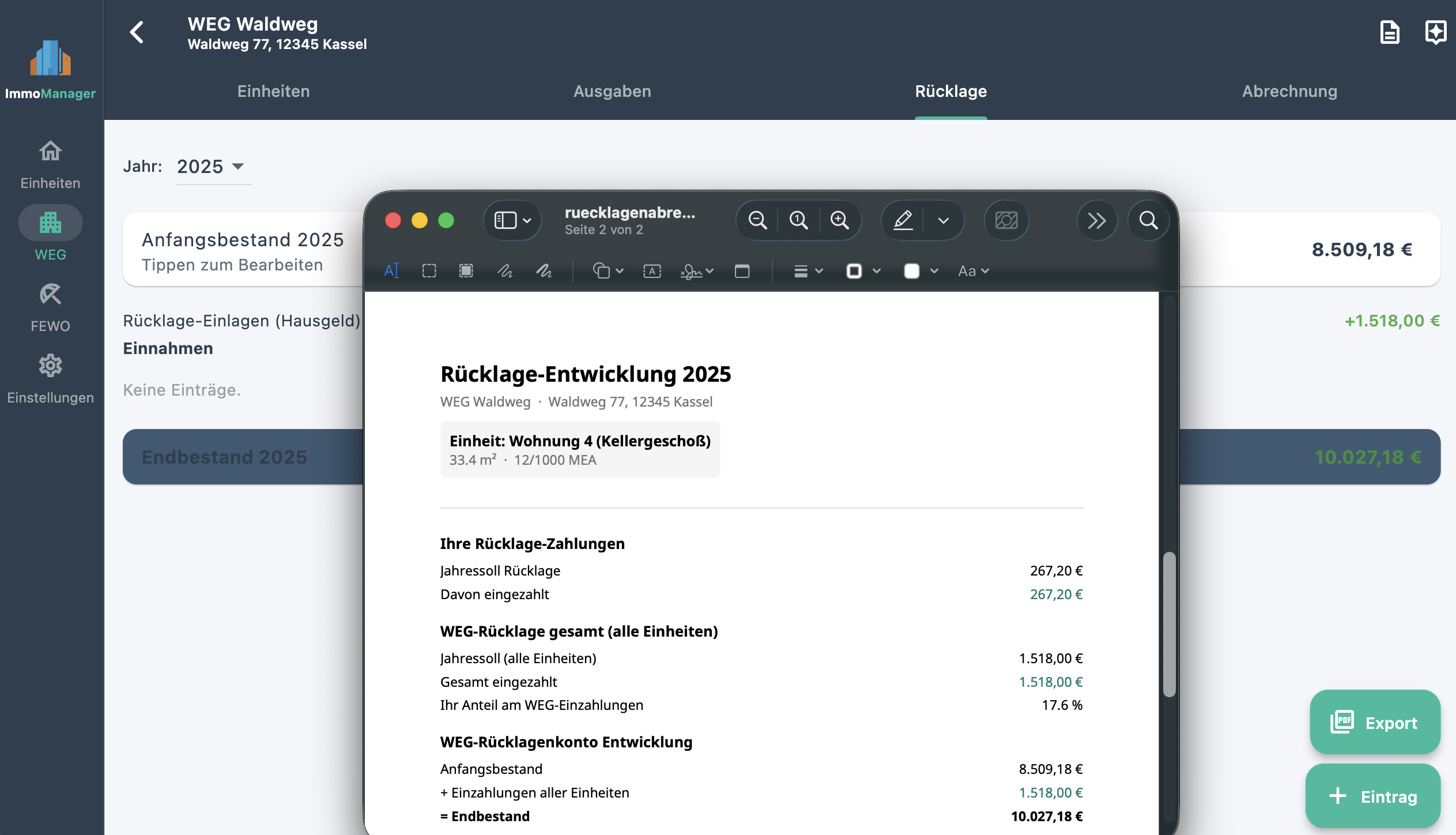
ImmoManager maintains the HOA's reserve fund account in full: opening balance, monthly inflows from owners (target vs. actual paid), withdrawals for maintenance measures, and interest income from the savings account.

Interest certificates from the bank can be uploaded via drag & drop — the AI reads capital income, withholding tax, and solidarity surcharge as separate items. The result can be reviewed and corrected before saving. The account balance is calculated automatically.

Reserve fund account

Lease Analysis & AI Assistant

AI reads your lease — and remembers the rules.

Which costs can I pass on? ImmoManager knows.

Every lease is different: what one contract defines as allocable may be explicitly excluded in the next. ImmoManager analyses your lease via AI and extracts all the relevant clauses — which operating costs may be passed on, special agreements, exceptions.

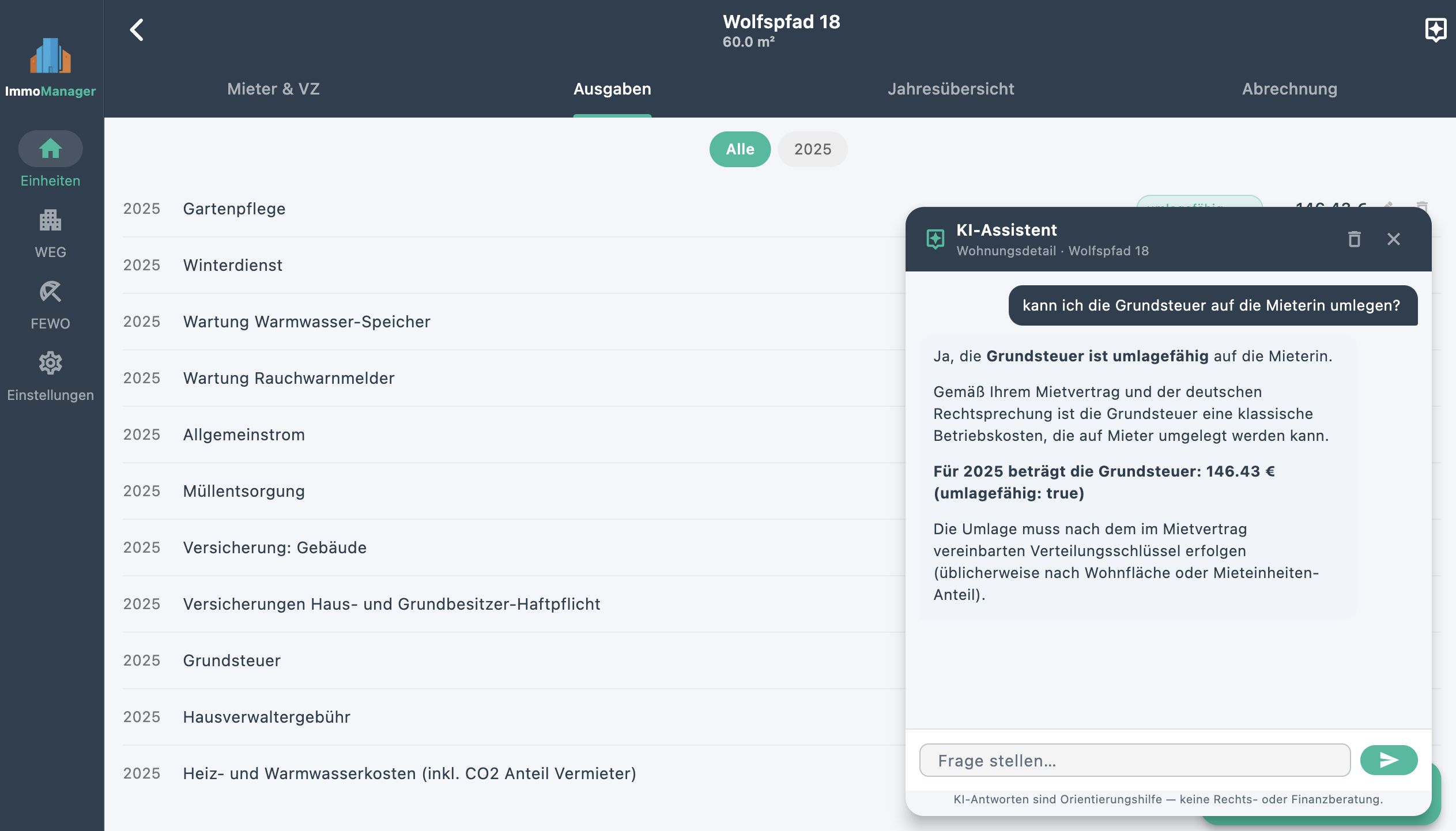
The result is stored in a structured way and is available to the AI assistant for every question. If you ask "Can I pass on the property tax to this tenant?", ImmoManager answers on the basis of the actual contract — not just general tenancy law.

How lease analysis works

1

Upload the lease as a PDF — via drag & drop or file selector.

2

AI analyses the contract and extracts clauses on service charges, allocation rules, and special agreements.

3

The AI assistant knows the contract and gives contract-based answers — not just general tenancy law.

Analysed once — available permanently.

AI Assistant & Document Analysis – Quick Overview

Photograph a receipt, analyse a lease, ask questions about tenancy law — directly in the app, with your own API key, without data on third-party servers.

AI Assistant: just ask

The built-in AI assistant answers questions about tenancy law, service charge law, and how to use the app — directly from the context of each property. It knows your expenses, tenant data, advance payments, and the analysed lease.

Typical questions: "How high was the utility bill balance in 2023?", "Can I allocate the building cleaning costs?", "How do I calculate the pro-rata billing for a mid-year tenancy change?" — The assistant automatically retrieves the necessary data and answers precisely.

Ask the AI

Utility Billing

Correct statements. At the push of a button.

From expense to finished statement

100% Speed

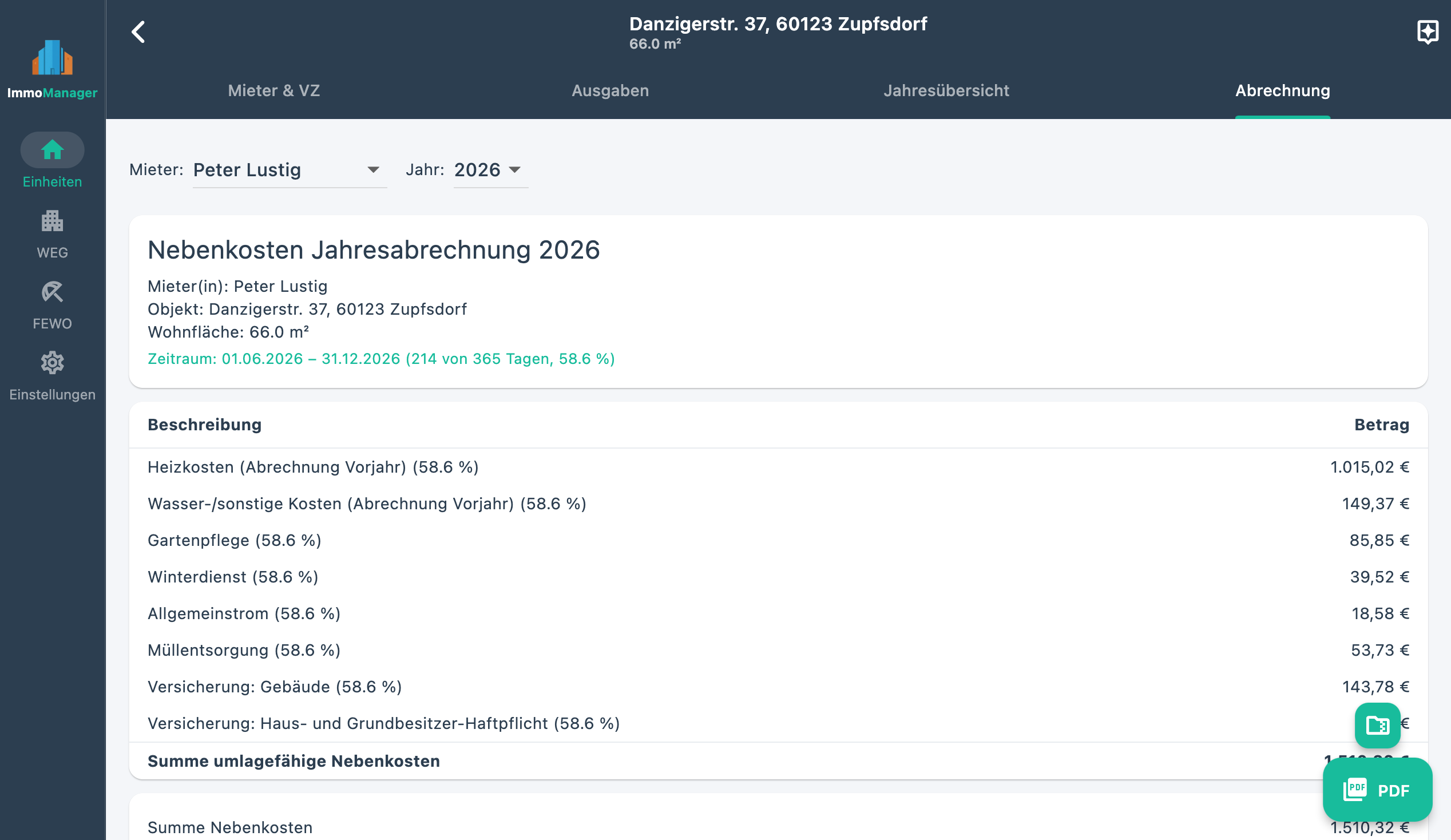
Once your expenses are recorded, ImmoManager automatically calculates the utility bill: allocable costs are billed to the tenant, advance payments made (service charge and heating separately) are credited, and the balance — additional payment or refund — is immediately clear.

If a tenant has only been in the property for part of the year, costs are calculated on a pro-rata basis by the day. The system transparently shows which items have been allocated proportionately and which apply in full.

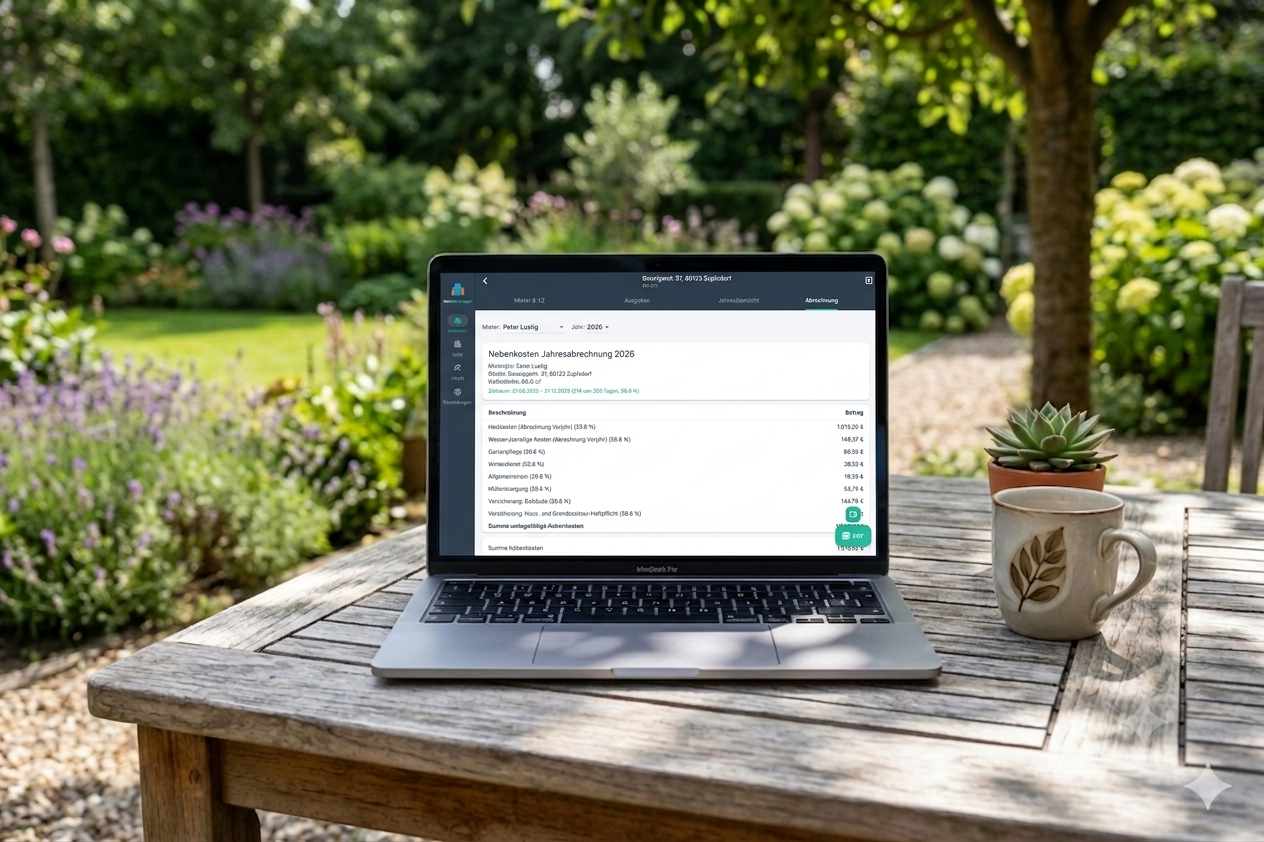
Utility billing

📅 Multi-year selection

Statements for past years are available at any time. Tenants change, figures change — the history is always fully preserved.

📑 PDF download

The finished statement is generated as a cleanly formatted PDF with one click — ready to print or send directly to the tenant by e-mail.

🗜 Receipts as ZIP

All receipts for allocable expenses in a given year can be downloaded as a ZIP archive — useful when the tenant requests proof.

HOA Service Charge Statement

Annual statement per owner — at the push of a button.

Statement per unit and owner

ImmoManager calculates the individual service charge statement for each HOA unit: advance payments made are compared with actual costs — broken down by the chosen allocation key (co-ownership share, floor area, number of occupants, or fixed amount).

The statement is divided into four sections: allocable communal costs, non-allocable costs, reserve fund contribution, and withdrawals from the reserve fund. The result — additional payment or credit — is immediately clear and output as a print-ready PDF.

Service charge statement structure

1 Allocable costs (by allocation key)
2 Non-allocable costs (unit-specific)
3 Reserve fund contribution (target amount)
4 Reserve fund withdrawals (proportionate by co-ownership share)
Result Additional payment / credit → PDF

Annual Tax Overview

Schedule V — no more guesswork.

Income and deductible expenses at a glance

100% Simplicity

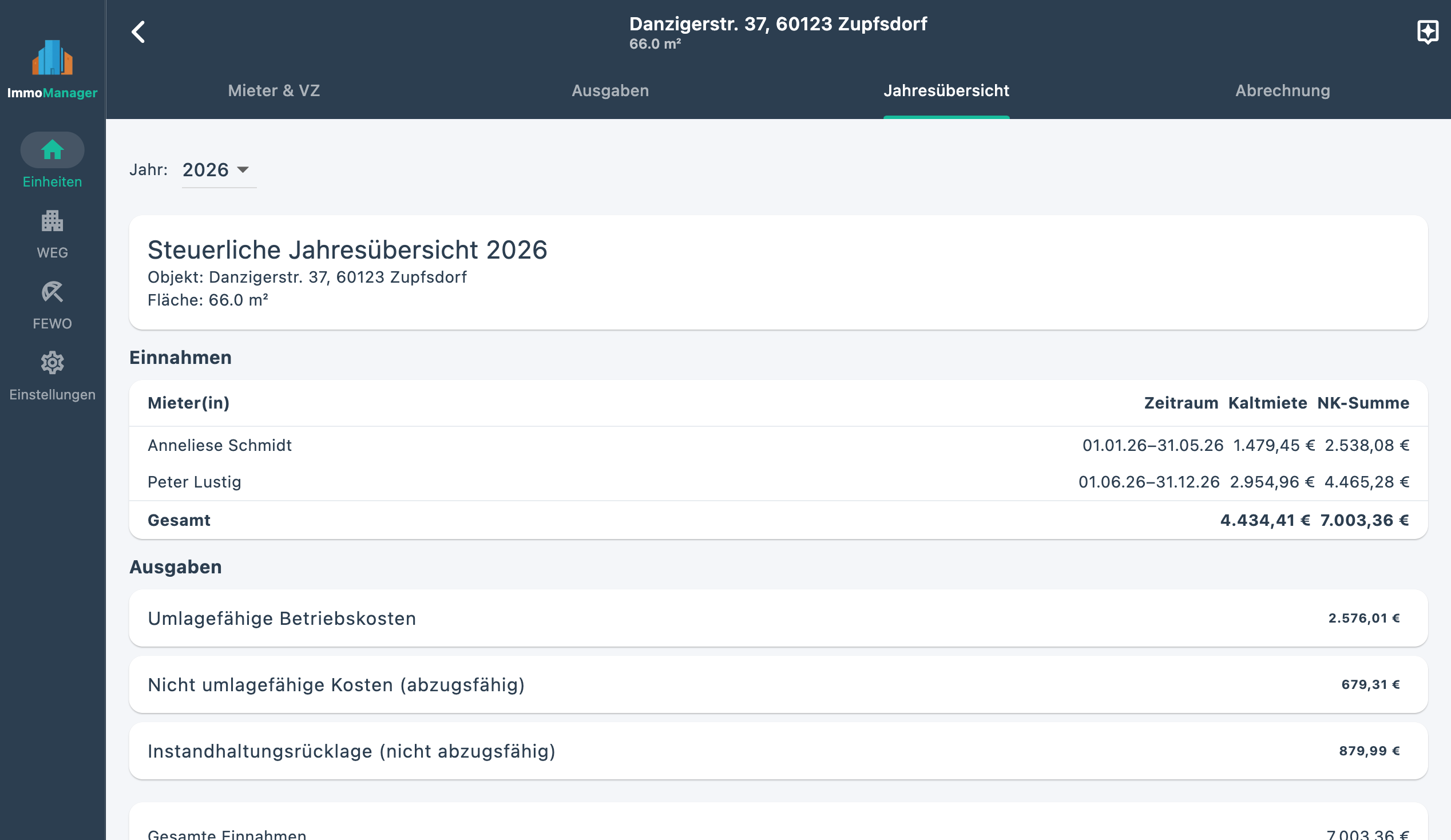
ImmoManager summarises what is tax-relevant for each property and tax year: net rent, advance payments made, utility bill balance — on the income side. On the expense side: allocable operating costs, non-allocable deductible expenses, and reserve fund contributions (which are not tax-relevant).

The result immediately shows whether the property generates a surplus or an excess of expenses. Both have tax consequences — and both are clearly documented in the PDF overview.

Annual tax overview

Holiday Let & Tax Overview – Quick Overview

Record income from Airbnb etc., categorise expenses for tax purposes, automatically calculate depreciation, and export the tax document at the push of a button.

"I always used to put off Schedule V because I had to hunt everything down first. Now it takes five minutes."

🗂 Assign cost categories correctly

When recording each expense you specify: allocable, non-allocable (deductible), or reserve fund. ImmoManager automatically assigns the categories correctly in the tax overview.

📆 Available by year

The tax overview is available for every completed year — ideal when the accountant asks or a tax audit is imminent.

📎 Receipts as ZIP

All receipts for a tax year — allocable and non-allocable — can be downloaded as a ZIP archive. Organised by expense, named by address and year.

AI Receipt Analysis

Scan a receipt — data filled in automatically.

Upload a photo — fields are filled in

100% Automation

Instead of manually entering amount, date, and description: upload a receipt (PDF or photo), AI analyses the document and fills in all fields automatically. You take a quick look, click Save — done.

This works reliably with tradespeople's invoices, property management statements, heating cost invoices, or any other receipts. For HOAs, the AI also reads interest certificates from the bank — capital income, withholding tax, and solidarity surcharge are transferred as separate items into the reserve fund account. For unclear documents, you can review and correct all fields before saving.

How to set up the AI

1

Choose a provider — OpenAI, Claude, Mistral, or Gemini. Most offer a free starting allowance.

2

Register for free and create an API key — takes about two minutes.

3

Enter the key in ImmoManager — done. The app guides you there on first launch.

Set up once. Then everything runs automatically.

Four Providers Compared

OpenAI GPT-4o

Recommended

  • Reliable & proven
  • Excellent text recognition
  • PDFs automatically converted to images
  • Pay per use from approx. €0.01/receipt

→ Get API key

Anthropic Claude Haiku

Most affordable option

  • Excellent extraction
  • Lowest cost per receipt
  • PDFs converted
  • US-based provider

→ Get API key

Mistral Pixtral

European provider

  • Excellent image recognition
  • EU server location (France)
  • PDFs converted
  • Pay per use

→ Get API key

Google Gemini

PDF-native

  • Reads PDFs directly (no conversion)
  • Generous free tier
  • No credit card required to start
  • US-based provider

→ Get API key

No lock-in: You can switch provider in the settings at any time or set it to "No provider" if you don't want to use the AI features. All four providers work with the same workflow — upload receipt, review, save.

Privacy & Data Security

Your tenant data belongs only to you

100% Protection

ImmoManager is a native desktop app that runs locally on your computer. Your data — tenants, expenses, receipts — is stored exclusively on your device. If you use the AI receipt analysis, the respective receipt is transmitted for analysis to the provider you have chosen (OpenAI, Claude, Mistral, or Gemini). All four providers process the data on the API side and do not use it for training their models.

All data — database and receipts — is stored in a single local folder on your computer. You can back up this folder at any time or transfer it to a new device.

No subscription. No login. No internet connection required. You buy once and use the app permanently.

Login / account required No
Monthly costs €0
Data storage location Locally on your computer
Data exportable At any time
Internet connection required No (except when using AI features)

Frequently Asked Questions

How many properties can I manage?

Unlimited. ImmoManager places no restriction on the number of properties or tenants. Whether you manage one flat or ten — the app grows with you.

What happens if a tenant moves in or out mid-year?

ImmoManager fully supports pro-rata billing. On the move-in or move-out date, the system automatically calculates the day-fraction of the year and suggests the appropriate proportion for allocable costs. Fully assigned costs (e.g. a specific repair) are taken over in full. The statement transparently shows both.

Can I still view former tenants and past statements?

Yes. Former tenants remain in the system and their statements are available for all recorded years. When archiving a property, the complete history is retained.

How do I back up my data?

All data is stored in a local folder on your Mac. You can back up this folder using Time Machine, an external hard drive, or any backup tool. To switch to a new Mac, simply copy the folder to the new device.

Which receipts can I attach?

PDFs and images (JPEG, PNG). The app opens the native macOS file dialogue for this. The files are stored in the local data store and are assigned to a property and an expense.

Can I manage an HOA with ImmoManager?

Yes. ImmoManager supports HOAs with any number of units and owners. You record expenses with a flexible allocation key (co-ownership share, floor area, number of occupants, or directly to a unit), maintain the reserve fund account, and create an annual statement per owner as a PDF. Bank interest certificates can be read in via AI analysis. New: upload the declaration of division (TE) as a PDF — AI identifies all units and suggests them for import.

Is the app suitable for tax advisory purposes?

ImmoManager is a tool for preparing your tax return. The overviews generated do not replace professional tax advice. The programme applies the cash basis principle and notes that utility bill balances are tax-relevant at the time of settlement.

What are the system requirements?

macOS: macOS 13 Ventura or later, Intel or Apple Silicon (M1/M2/M3/M4). The DMG version is built as an ARM binary; on Intel Macs it runs via Rosetta 2 (one-time installation via terminal: softwareupdate --install-rosetta --agree-to-license).
Windows: Windows 10 or later (64-bit).
iOS: iOS 16 or later (iPad).
Android: Android 8.0 or later. No Python or other dependencies needed in any version. No internet connection is required for basic operation; AI features require one.

What features are included in the purchase price?

The one-time purchase includes: unlimited properties, tenants & HOAs, utility billing as PDF, HOA service charge statement as PDF, reserve fund account, annual tax overview, receipt management (PDF & images), ZIP export for the accountant, declaration of division import, lease analysis and AI assistant, and multi-year support. AI features (automatic receipt analysis, lease analysis, AI assistant) are billed on a usage basis through your chosen AI provider.

Does ImmoManager also run on Windows?

A Windows version (Windows 10 or later, 64-bit) is planned for July 2026 and is included in the purchase price. ImmoManager is currently available for macOS, iOS, and Android.

Is there an iOS and Android version?

Yes. ImmoManager is available for iPad (iOS 16 or later) and Android (8.0 or later) and offers the same feature set as the desktop app. Data is stored locally on the device — no login or server synchronisation required. The iOS version is available on the Apple App Store; with Universal Purchase, the App Store purchase is valid for both iOS and macOS simultaneously.

What does the lease analysis do?

ImmoManager can read an existing lease as a PDF and use AI to extract all relevant clauses on service charges and allocation rules. The result is stored in a structured way and feeds into the AI assistant: when you ask whether a particular type of cost is allocable, the app answers on the basis of the actual contract — not just general tenancy law. Analysis is optional and supplements the manual workflow.

What can the AI assistant do?

The AI assistant answers questions about tenancy law, service charge law, billing, and how to use the app — directly from the context of the relevant property. It can access your recorded expenses, tenant data, advance payments, and the analysed lease, and gives answers tailored precisely to your situation. The assistant is optional and requires a configured AI provider.

What is the declaration of division feature?

In HOA management, the declaration of division (TE) contains all units with co-ownership shares, floor areas, and numbers. Instead of entering each unit manually, you can upload the TE as a PDF — AI analyses the document and suggests all recognised units for import. You review the result, adjust designations, and import with one click. The feature is particularly helpful for HOAs with many units.

Pricing

One-time purchase — no base fee, no subscriptions. AI features are billed on a usage basis directly with your chosen provider.

ImmoManager is tailored to German law (GoBD, DSGVO). Legal documents are in German. Stripe and the app stores handle geographic availability at checkout.

macOS

Desktop App · Direct purchase

One-time purchase · All future updates included

  • macOS 13 Ventura or later
  • Apple Silicon & Intel (via Rosetta 2)
  • Personal licence key by email
  • Instant download after purchase

By purchasing you agree to the Terms of Service.

App Store

iOS & macOS · Universal Purchase

One-time purchase · For all Apple devices

  • iPad (iOS)
  • Mac (macOS App Store)
  • Universal Purchase: one purchase, all Apple devices
  • No licence key required
Download on the App Store

Recommended for iOS and Mac users. * App Store price may vary slightly.

Google Play

Android · Play Store

One-time purchase · For all Android devices

  • Android Tablet
  • From Android 8.0
  • No licence key required
Download on Google Play

Contact

Interested in ImmoManager or have questions? Write to us — we reply personally.